
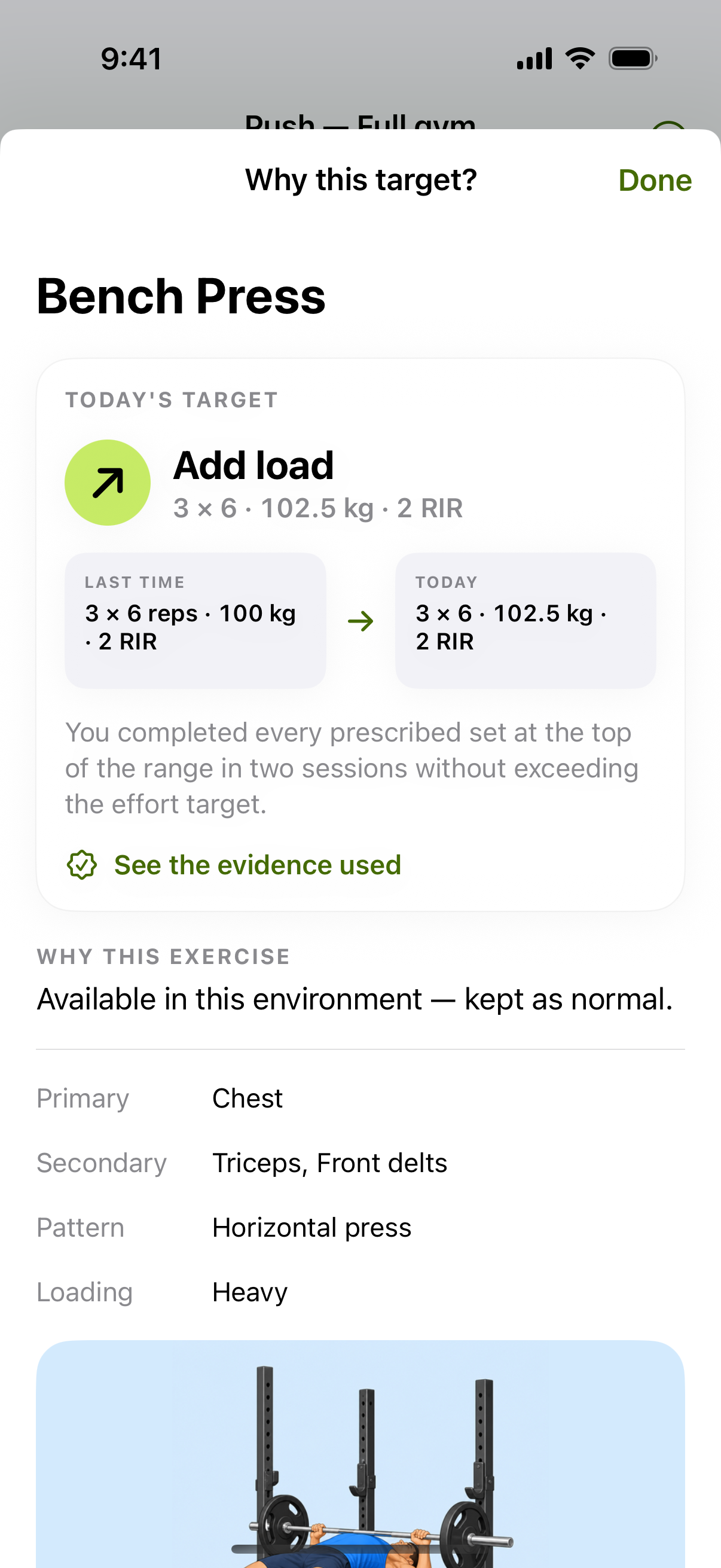
A target you can inspect
In the example shown, the previous bench-press entry is three sets of six at 100 kg with two reps in reserve. The explanation says that the top of the prescribed range was completed in two sessions without exceeding the effort target. The next displayed target is 102.5 kg for three sets of six.
These numbers come from an app demonstration, not a claim about a customer's results or a suggested starting weight. Your targets depend on your exercise, history and circumstances.
Reps, load and holding steady
| Pattern in the log | Practical response to review |
|---|---|
| Sets still below the top of the rep range | Build repeatable reps before assuming the weight should increase. |
| Repeated top-of-range sets at the intended effort | A small load increase may be appropriate. |
| Incomplete sets or unusually high effort | Hold or reduce the demand rather than treating every session as a record attempt. |
| Different equipment or exercise | Calibrate that movement; do not copy an unrelated exercise’s working load. |
This table explains common progression decisions. It is not a complete specification of every recommendation: readiness, recovery and available equipment can change the final session.
Log enough detail to make the next target useful
Record completed sets, the actual load, repetitions and effort. Reps in reserve describes how many more controlled reps you estimate you could have performed. Two RIR means about two more, not two extra reps already completed.
Keep technique and range consistent when comparing entries. If you change grip, tempo, equipment or assistance, note the variation. An impressive number without comparable execution gives the next recommendation a weaker basis.
Before accepting a higher load, use appropriate warm-up sets. A recommendation is a target to review, not a reason to continue through pain or ignore a difficult day.
Progress does not have to mean more weight today
A useful training trend can include more controlled repetitions, steadier technique or completing the same work at lower effort. Bodyweight exercises may progress through variations rather than kilograms. Recovery adjustments can temporarily lower the prescription even when your long-term goal is to get stronger.
The explanation is there to make those choices understandable. Use the history across several exposures to the same lift instead of changing the program after one disappointing session.
Progression app questions
Will it add weight every workout?
No. Progression should respond to completed work, exercise context and recovery. A repeated target can be the appropriate next step.
Can it choose my first weight perfectly?
No app can know your capacity precisely before you perform the movement. Treat starting estimates conservatively and calibrate with a controlled practice set.
Is it a replacement for a coach?
It organizes training decisions and explains targets. It cannot observe every rep, diagnose an injury or replace individual professional guidance.
App access
Adapt Fitness is built for iPhone. Pro subscriptions are offered in the app; check the current paywall for included features, pricing and trial eligibility before purchasing. Screen appearance and availability can vary by version.
Put it into practice
Make the next session easier to plan.
Choose your plan, review your session and log the work you actually complete.
Get Adapt Fitness ↗